

How to read a recipe without the ads and the life story
Short answer
Use the blog's Jump to Recipe button, or your browser's reader mode, for a quick look. For recipes you will cook again, paste the page link into Recepti: your saved copy shows only the ingredients, steps and key details, with a link back to the blog.
Free recipe sites pay for themselves with ads, and long intros help them get found. Both are fair. They just make cooking from a phone harder.
Three options
| Option | Good for | Keep in mind |
|---|---|---|
| Jump to Recipe button | A one-time look | Ads still load around the recipe card |
| Browser reader mode | Reading on a phone | Not every site supports it, and nothing is saved |
| Save it in Recepti | Recipes you will make again | Takes one paste; credit and link are kept |
Reader mode in a nutshell
- Safari on iPhone: tap the page menu in the address bar and choose the reader option.
- Chrome on Android: look for a simplified view or reading mode option in the menu.
- Desktop browsers: look for a reader icon in the address bar.
Save a clean copy
Paste the page link into Recepti. The saved recipe is the part you need while cooking. When you want the photos or tips, tap View original post and give the blog its visit.
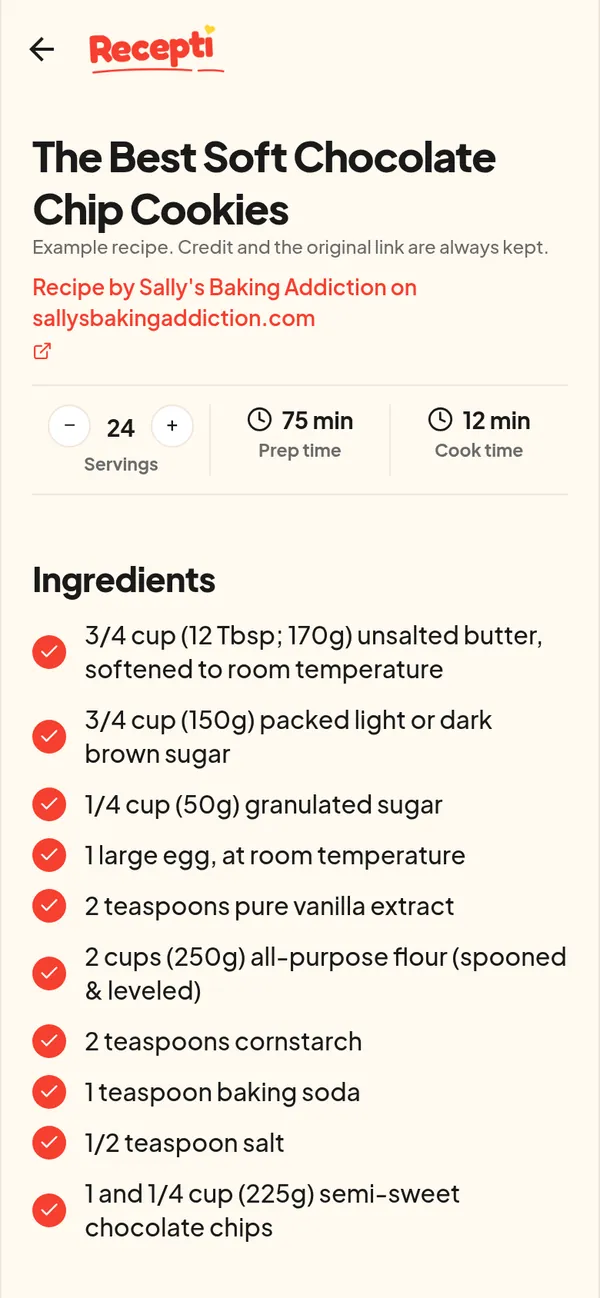
Paste a link and see what Recepti saves.
Try Recepti in your browserFree. No download. Start as a guest.
Questions
Is it fair to the blogger?
Recepti keeps the credit and a link back on every recipe and the terms ask you to keep saved recipes for personal use. Visiting the original page when you want the full story supports the creator.
Can I print the clean version?
See printing a recipe without ads for the options.